Search Tips



Troubleshooting Signal Strength
Use these steps to determine the signal strength, which can cause usability issues.
Verifying Signal Strength
-
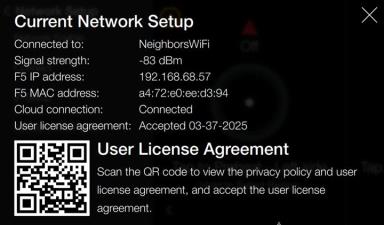
Verify the settings by navigating to: Menu > Advanced > Network Setup > Network Information.
-
Review the Current Network Setup:
-
Signal strength: 0 to -83 dBm, the closer to "0" the stronger the signal. The higher the negative number the weaker the signal.
-
-
Depending on what is displayed, do the following:
-
If the signal is weak where the appliance is installed, speak to the operator's IT technician to seek a solution.
-
If an operator solution isn't available, offer the Henny Penny gateway solution, for example model ICG-150 cellular gateway.
-