Search Tips





Changing from a Dedicated Display to a Multi-Product Display
Switching from Dedicated Mode to Undedicated Mode (Flex vat) allows the vat to be used for multiple products, giving more flexibility during low volume, menu changes, or peak periods.
-
Tap the Menu icon located in the lower left corner of the screen to open the Main Menu.
-
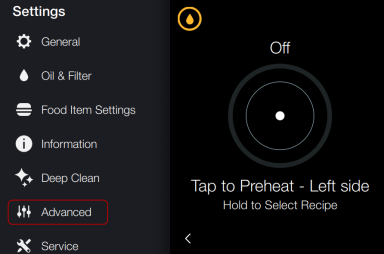
Tap the Advanced icon to enter Advanced Settings.
-
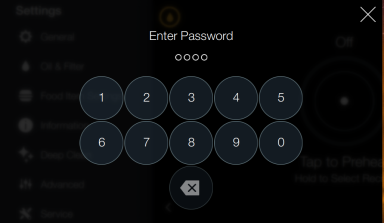
When prompted, enter code: 1-1-2-2.
-
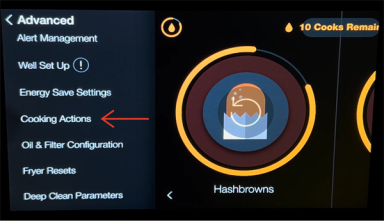
Scroll down until you see Cooking Actions and tap the Cooking Actions icon.
-
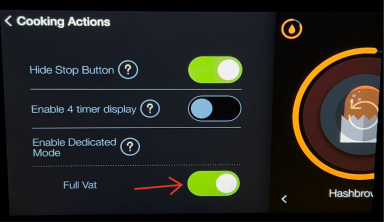
Tap the green toggle button next to the Enabled Dedicated mode option to disable it.
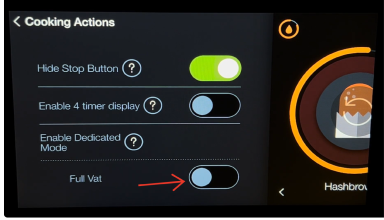
Once disabled, the toggle button will no longer be green.
-
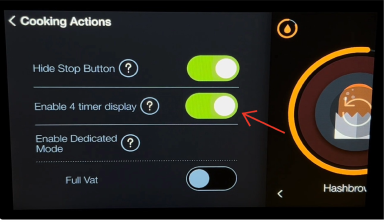
Verify the Enable 4 timer display is enabled.
The toggle button will display green.
-
Tap the Back Arrow to exit Cooking Actions.
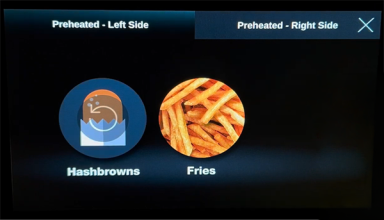
The fryer is now in Undedicated Mode (Flex vat).
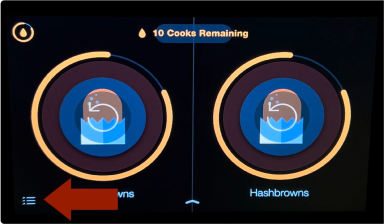
To confirm Undedicated Mode (Flex vat) mode is active, verify dedicated product labels are not locked to one side.
Disabling Dedicated Mode switches the equipment to Undedicated Mode (Flex vat), giving you the flexibility to cook different products on either side. This is especially helpful for operations that need to adapt quickly to volume changes.