Search Tips





Filling or Adding Oil

|
To avoid severe burns when pouring hot oil into vat, wear personal protective equipment (PPE) and take care to avoid splashing. |
|
|
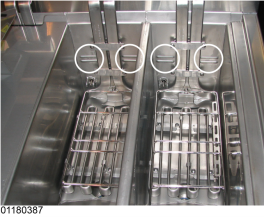
The oil level must always be above the heating elements and at the proper oil level indicator on the rear of the vat. Failure to follow these instructions may result in fire, severe burns, and/or damage to the fryer. |

|
Use high quality liquid frying oil in the open fryer. Some low grade oils have a high moisture content which causes foaming and boiling over. |
|
|
To avoid personal injury and fire, ensure that oil completely covers heating elements |
Do not bypass the Melt Cycle. The type of oil being used in the fryer determines the amount of heat applied during the Melt Cycle. If the controls are set to the Solid setting, less heat is applied to the solid oil than if the controls were set to Liquid. Too much heat applied to solid oil causes much smoking, and could cause a fire. Match this setting to the type of oil being used at the time. When using new solid oil, it is recommended to melt the solid oil on an outside source before placing oil in the vat.
Purge Mineral Oil
|
NOTICE - |
Mineral oil will contaminate cooking oil, causing excessive foaming and poor food quality. If mineral oil is not fully removed before filling the fryer for the first time, the cooking oil must be replaced immediately. To protect the fryer and achieve the best cooking results, carefully complete the following steps to fully remove mineral oil from all lines before adding fresh oil. |
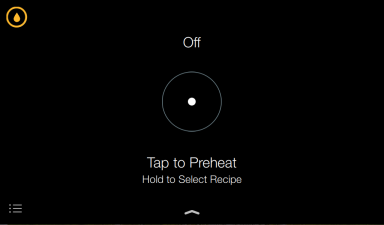
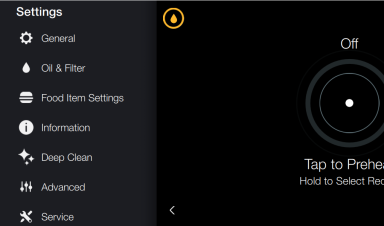
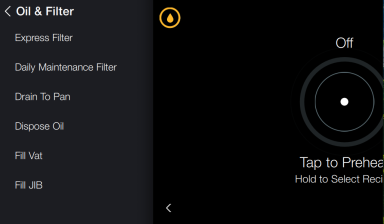
Quick navigation: Settings > Oil & Filter > Fill Vat > JIB
-
Tap the Settings Menu icon. Settings display.
-
Tap Oil & Filter. The Oil & Filter menu displays.
-
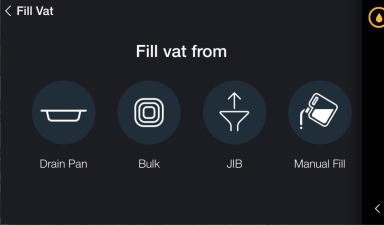
Tap Fill Vat. The Fill Vat menu displays.
-
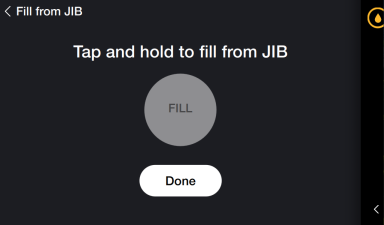
Tap JIB. The Fill from JIB menu displays.
-
Tap Fill and hold until clean oil begins to fill vat. Mineral oil and water in the lines will purge into the vat.
-
Tap Done. Control exits to Preheat menu.
-
Wipe out the vat thoroughly and remove all mineral oil and water.
IMPORTANT: DO NOT fill vat. Once clean oil begins to fill vat, STOP.
Oil Capacity
LVE 300 - 30 lb. or 15 L
Filling Vat Manually
Each vat has two level indicator lines. The upper fill line (1) indicates proper oil level at set-point temperature. The lower fill line (2) indicates proper oil level at room temperature. When filling an empty vat with room temperature oil, fill to the center of the lower fill line (2). As oil heats, it expands to the upper fill line (1).