Search Tips


Troubleshooting the User License Agreement (ULA)
Use these steps to determine if the User License Agreement (ULA) has been accepted.
Verifying User License Agreement (ULA)
-
Verify the settings by navigating to: Menu > Advanced > Network Setup > Network Information.
-
Review the Current Network Setup:
-
User license agreement: [e.g., Accepted 03-19-2025] displays the User License Agreement (ULA) acceptance.
-
-
If the license is not accepted, do the following:
-
Verify the cloud connection is connected.
-
Complete the User License Agreement (ULA) instructions.
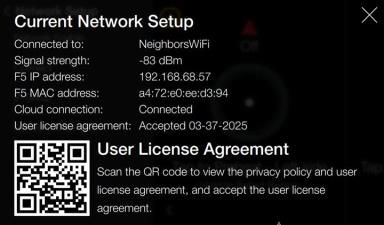
Confirming Network Information and ULA (User License Agreement)
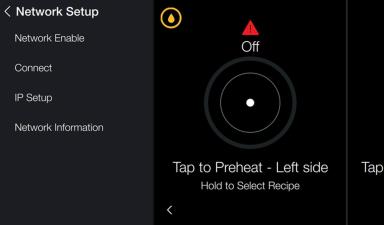
Navigation: Settings > Advanced > Network Setup > Information
-
Tap Network Information for additional network details. User license agreement displays, Not accepted.
-
Scan the QR code and follow instructions to accept the user license agreement. The QR Code directs to commissioning.hennylink.com for commissioning of the unit.
-
Tap X to return to the Network Setup menu.